GAME Session Walkthrough
Gaming with assistive technology is a personal journey. There is no one-size-fits-all solution; instead, these best practices serve as a roadmap based on Makers Making Change’s experience working with partners such as the Stan Cassidy Centre for Rehabilitation. This is intended to help a clinician, family member, or player think through trialing adaptive gaming equipment.
The Gaming Session
Trialing adaptive gear before purchase is important for finding a setup that works. While every center operates differently, the following framework provides a flexible guide.
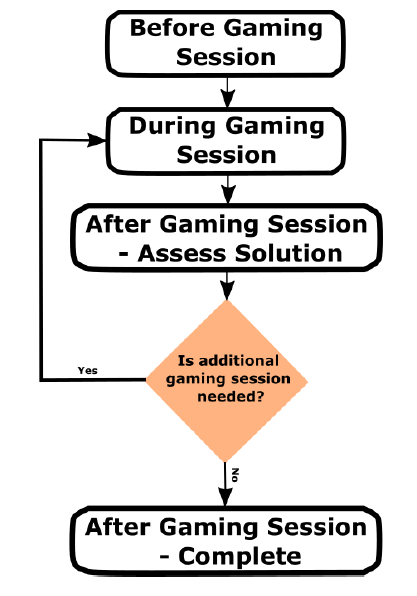
The Gaming Session - Overview
General Session Breakdown
| GAME Session Step | Why | Tool/Resource |
|---|---|---|
| 1. Before | Gather user information and prepare initial solutions | Gamer Questionnaire |
| 2. During | Test and adjust equipment and settings | Equipment Sections |
| 3. Assess | Evaluate outcomes and determine next steps | Equipment Sections |
| 4. Finalize | Document and support setup acquisition | Support Options |
These Steps are Flexible.
Customize this workflow based on your resources and goals.
1. GAME Session - Before
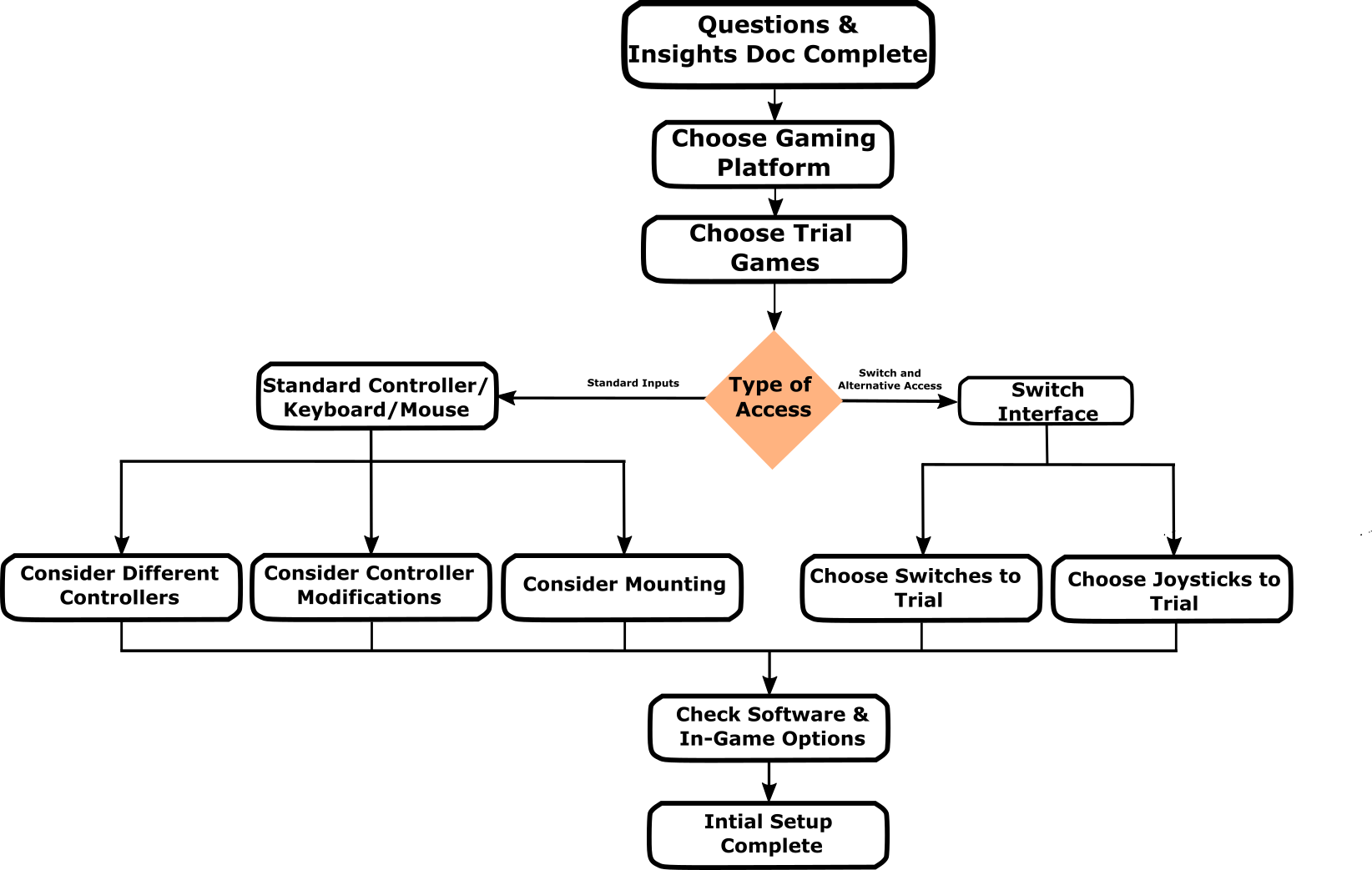
The Gaming Session - Before
Question: Has a clear gamer goal been identified?
If Yes
Focus the session on that goal (specific game, activity, or experience).
If No
- Ask what games or genres interest them
- Ask if they have played before
- Ask what they want to achieve
If unsure, start with a simple, low-input game.
Question: Is the preferred gaming system known and available?
If Yes
Use their preferred or most-used system.
If No
- Ask what system they want to use
- Consider where their friends play
- Consider types of games
If unavailable:
- Try a similar system
- Use adapters where possible
- Choose the best available system for the trial
Question: Has an appropriate trial game been selected?
If Yes
- Matches their goal or genre
- Has manageable input requirements
- Has a low-stress entry point (tutorial, freeplay)
If No
- Match the genre or goal game
- Start with fewer inputs if needed
- Choose slower-paced or simpler games
If needed:
- Start simple and progress toward the goal game
Question: Has an appropriate controller or access method been selected?
If Yes
- Standard or modified controllers
- Switch interface setups
- Alternative inputs (e.g., mouth joystick)
If No
- Try a standard controller to assess barriers
- Try a switch interface if needed
- Consider mounting or alternative layouts
Question: Is the setup prepared and stable?
If Yes
- Equipment is available
- Game is ready to launch
- Mounting solutions are stable
If No
- Prepare mounts (RAM, trays, Velcro)
- Gather controllers and adapters
- Check game updates and starting point
Intial Game Selection
- You do not have to start with their gaming goal game
- Try a low risk situation to make sure everything works
- We often use the game Brawlhalla under training mode. Only requires one joystick and a few buttons, free, and fun!
- If there is a large gap between the user’s current gaming abilities or number of inputs they can access, and the number of inputs that their goal game will require consider starting not with their gaming goal game.
2. GAME Session - During
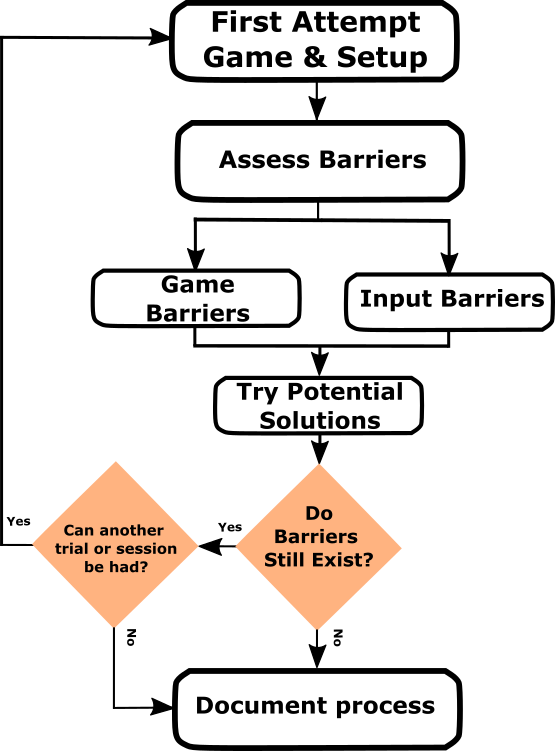
The Gaming Session - During
Question: Can the user begin interacting with the game?
If Yes
Move into gameplay and observe performance.
If No
Identify the issue:
- Navigation difficulty
- Physical access issue
Adjust:
- Button mapping
- Positioning
- Provide guidance if needed
Question: Are barriers present during gameplay?
If Yes
Game-related barriers:
- Adjust difficulty or settings
- Try different modes
- Try a different game if needed
Controller-related barriers:
- Change layout or mapping
- Try different hardware
- Adjust switches or joysticks
- Consider mounting or alternative inputs
If No
Continue gameplay and confirm consistency
Question: Is the user experiencing fatigue or frustration?
If Yes
- Pause the session
- Reduce effort required (force, positioning)
- Take breaks
If No
Continue while monitoring comfort
Question: Has the setup been documented?
If Yes
- Equipment used
- Layout and positioning
- Game settings
If No
- Record what worked and what didn’t
- Take photos of setup
- Note barriers and solutions
3. GAME Session - Assess
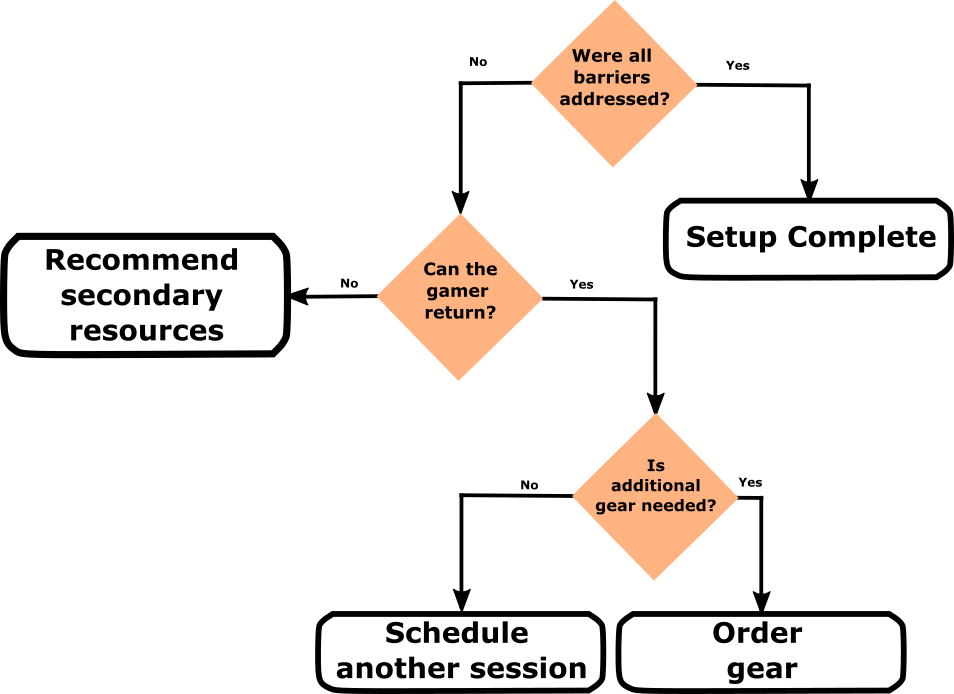
The Gaming Session - Assess
Question: Did the setup meet the gamer’s goal?
If Yes
Move forward with finalizing the setup.
If No
- Schedule another session if possible
- Identify additional equipment to try
- Document remaining barriers
Question: Are additional resources or equipment required?
If Yes
- Explore new hardware options
- Try different game approaches
- Look into external supports
If No
Proceed to finalize
Question: Does the user need external support?
If Yes
- Makers Making Change
- AbleGamers
- Funding options if available
If No
Continue to final setup
4. GAME Session - Finalize
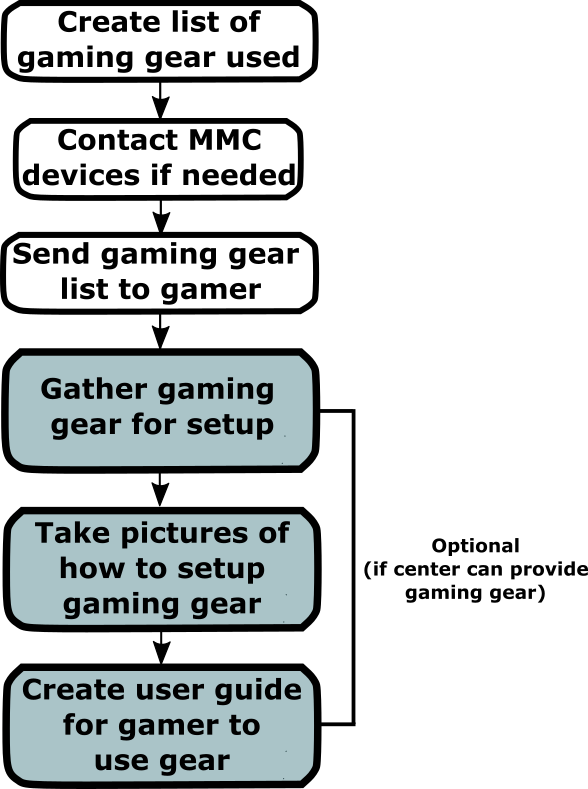
The GAME Session - Finalize
Question: Has a full equipment list been created?
If Yes
- Full list of devices
- Required accessories
- Purchase links if possible
If No
- Document all hardware used
- Include setup notes
- Consider home setup requirements
Question: Does the setup include open-source devices?
If Yes
- Submit a request through Makers Making Change
- Include device details
- Attach notes and photos
If No
Proceed with commercial options
Question: Has the user received all setup information?
If Yes
- Confirm understanding of setup
- Confirm settings and equipment sourcing
If No
- Provide equipment list
- Provide setup photos
- Provide settings and instructions
Question: Is additional support required?
If Yes
- Schedule follow-up session
- Provide setup guide with images
- Assist with equipment delivery if possible
If No
Ensure the user can independently set up and use the system

Want to learn more about this program or request a device?
Copyright © 2026 Neil Squire / Makers Making Change. Content is licensed under the CC BY SA 4.0 License. This website is built with MKDocs. MKDocs is MIT-licensed software and is not covered by the CC BY-SA license applied to this site's content.
Visit Makers Making Change